All work

Case study · Tool

Coffee

My laptop kept falling asleep and killing hours-long AI jobs five minutes in. Every keep-awake tool I found was just-not-it, so I built the one I wanted.

Year
2026
Role
Solo — the Python tray app, the web UI, the floating pill, and the honesty.
PythonWebView2JavaScript
01

Problem

I run long jobs all day — Claude Code, agent runs, model training — the kind you kick off and walk away from, that take hours. And my laptop kept quietly falling asleep about five minutes in and taking the progress with it.

One afternoon during my internship I left an AI experiment running over lunch. A few hours of work — perfect to let run, I thought. I came back and the laptop was asleep. Pass 1 of 5. It had worked for about five minutes and then decided that was enough. I needed those results for my report, and I did not have the time to run it all again.

So I went looking for something to keep the machine awake, and everything I found was just-not-it. A mouse jiggler that literally slid my cursor back and forth. One that was paid. One that looked like it shipped with Windows Vista. One with no timer at all — so a two-hour job at night meant leaving the whole machine on until morning. None of them were the small, honest thing I actually wanted, so I built it: Coffee.

02

How it works

Coffee is a little Python app that lives in the system tray and makes the actual keep-awake call to Windows. The face of it — the steaming cup, the countdown ring, the duration picker — is a small web UI. I'm not precious about the internals; I build with AI tools and I care that it works and looks right, not about which widget toolkit drew it. The one thing I designed around on purpose: keeping a PC awake is not a command you give the operating system, it's a request, and the app should act like it knows that.

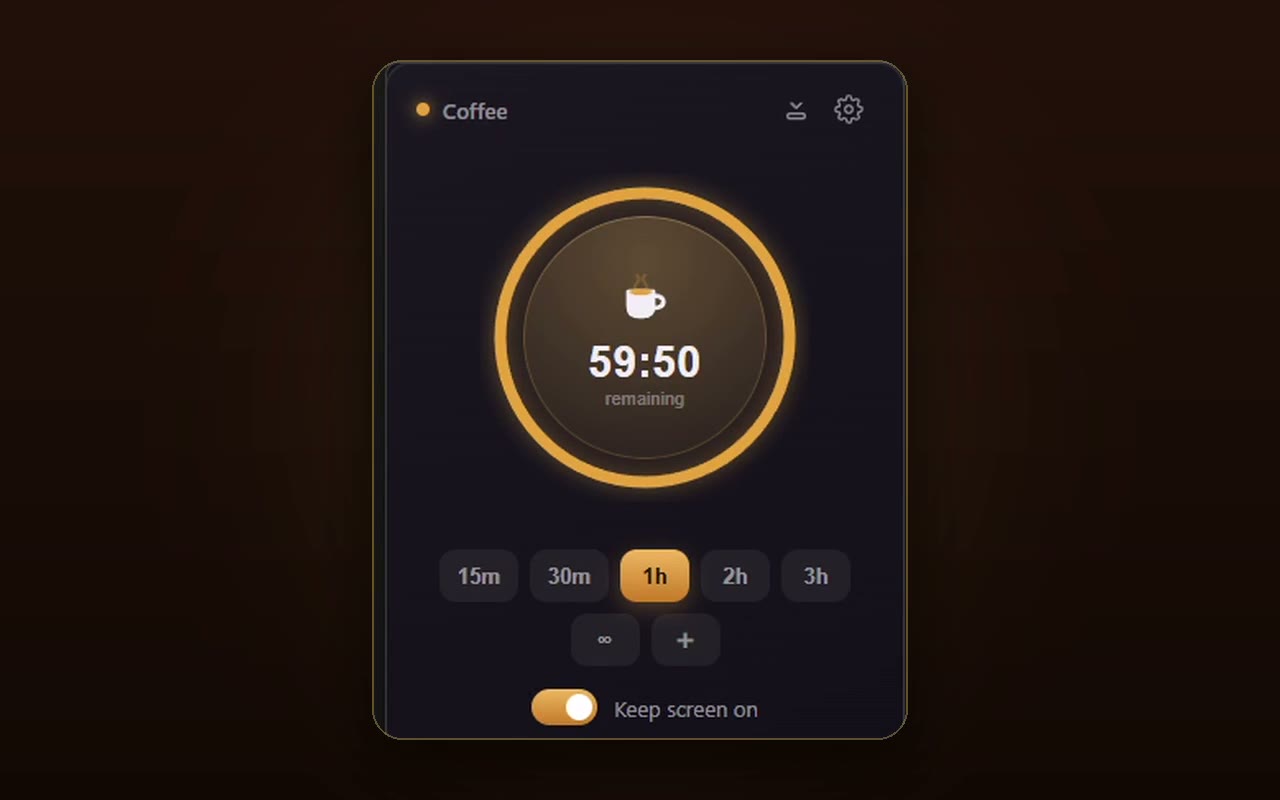
The Coffee running window: a Coffee title bar, a large amber countdown ring around a steaming cup reading 59:50 remaining, a row of duration buttons (15m/30m/1h/2h/3h, ∞, +), and a Keep screen on toggle.
The running window, taken apart — hover a tick to read what each part is doing.

While it runs, you tuck it out of the way: collapse Coffee into a little pill that floats on your screen — small, quiet, and still telling you it's holding the machine awake. That docked pill is the state it spends most of its life in, so it got as much care as the full window did.

The docked pill: collapsed out of the way, floating on the desktop with a steaming cup and a live countdown — the state it spends most of its life in.
03

Decisions & tradeoffs

The decision I actually care about is telling the truth in the UI. Most keep-awake tools quietly fail against a locked screen, a company sleep policy, or battery saver, and leave you guessing whether they're even working. Coffee puts up an honest banner instead: it can't override a corporate lock policy, it won't survive the lock screen, and on battery the system may still sleep. That honesty is the difference between a tool you trust with a four-hour job and one you keep nervously checking.

Owning what the tool can't do, out loud, is the whole point. It does exactly what it says, and says exactly what it can't.

04

What didn't work

There is no clean “stay awake no matter what” on Windows. The keep-awake API is a hint the OS is free to overrule — the lock screen, group policy, and battery settings all outrank it. I spent a while trying to make the guarantee absolute before accepting that the honest move was to surface the limit, not fight it. The banners are what's left of that fight, and they're better than the fantasy would have been.

05

Outcome

A tiny tool that does one thing and does it honestly: my laptop stays awake while the long jobs run, the timer means it doesn't stay awake all night for nothing, and the pill sits in the corner so I can forget about it. Nobody asked me to make a keep-awake app nice. I use it every single day, which is exactly why I did.

06

My role

Everything — the Python tray app and the Windows integration, the web UI and its animations, the floating pill, and the decision to make the app honest about what the operating system will and won't allow.